Access Tokens Forge
Flowie for Forge requires access tokens to keep repositories and pull requests in sync.
Workspace tokens are preferred because they cover all repositories in the workspace. They require Bitbucket Premium and are required for workspace and project-level configurations. Repository tokens can be used for individual repositories when a workspace token is unavailable.
One token is enough. We recommend at least five workspace tokens to improve performance and distribute API requests.
Automatic setupRECOMMENDED
With the Flowie browser extension installed, select Auto setup tokens on Flowie’s Tokens or Configuration page and follow the instructions on the page.
Flowie automatically creates the appropriate tokens with the required scopes and saves them for you. Workspace tokens can be created in bulk, making setup faster and reducing mistakes without manually copying and pasting each token.
Manual setup
If you prefer to set up tokens manually, follow the steps below.
- Create a workspace token or repository token in Bitbucket, selecting the scopes below and an expiry that meets your workspace policy.
- Copy the token when Bitbucket displays it; it is shown only once.
- Paste workspace tokens under Workspace settings > Flowie > Tokens > Workspace tokens. Paste repository tokens on that repository’s Flowie > Configuration page. Select Add token.
Required scopes
For workspace tokens, select the scopes shown below:
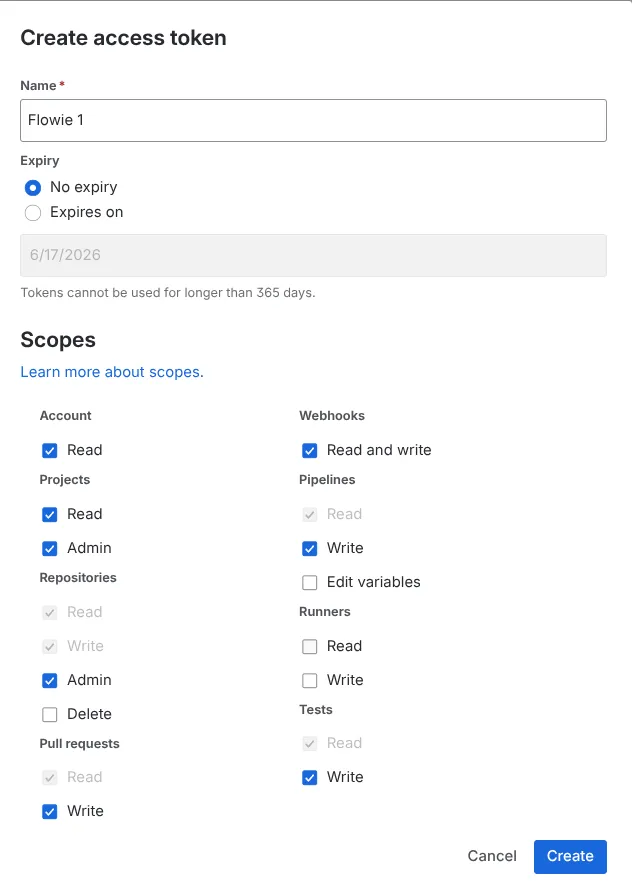
For repository tokens, select Repositories: Admin, Pull requests: Write, Webhooks: Read and write, and Pipelines: Edit variables. Keep any read permissions Bitbucket selects automatically.